
Historically, DevOps is an approach that aims to improve collaboration between developers in order to accelerate application development, deployment, and maintenance cycles. It relies on automation, continuous integration (CI), and continuous deployment (CD) to ensure fast and efficient software delivery. Today, DevSecOps, which stands for Development, Security, and Operations, is a natural evolution of DevOps that is increasingly being adopted. This approach integrates security as a central element of the software development lifecycle, ensuring that security is taken into account from the design stage onwards.
The key principles of DevSecOps:
- Continuous integration of security: this pillar aims to include security from the start of development by integrating automated testing and analysis into the CI/CD pipeline, ensuring early detection of vulnerabilities.
- Automation of security controls: Automation enables vulnerabilities to be quickly identified and corrected by reducing human intervention, ensuring a smoother and more secure deployment of applications.
- Ongoing collaboration between developers, operations, and security teams: A successful DevSecOps approach relies on a culture of collaboration where every development stakeholder considers security, promoting effective communication and shared responsibility.
How Cyberwatch can support you in the DevSecOps cycle of your environments
During the build/CI phase
The build phase is the stage where a project’s source code is transformed into an executable element, often in the form of a Docker image. This phase is critical for integrating security controls upstream and preventing vulnerabilities from spreading to production environments.
Cyberwatch intervenes at this stage as an external scanner to analyze Docker images and identify their vulnerabilities directly from a continuous integration (CI) chain, whether with GitLab CI/CD or GitHub Actions.
Why integrate vulnerability scanning at the build stage?
- Early detection of flaws: images are scanned as soon as they are created, limiting the spread of vulnerabilities in subsequent environments.
- Automation of controls: each pipeline triggers an analysis without manual intervention, ensuring continuous monitoring.
- Blocking risky images: if critical vulnerabilities are detected, it is possible to prevent the deployment of non-compliant images.
Docker registry scanning
Once images are built and validated, they are stored, shared, and deployed from Docker registries. These registries, whether private or public, facilitate the management, monitoring, and deployment of images across different environments.
However, vulnerabilities can appear over time on images that were initially compliant and are currently in production. To anticipate these risks, Cyberwatch provides continuous monitoring and performs regular scans of your images, enabling the detection of any new vulnerabilities that do not comply with your security policies.
Thanks to this automated monitoring, you are immediately alerted if a critical vulnerability is discovered, allowing you to act quickly to apply the necessary corrective measures.
With Cyberwatch, you can:
- Continuously list the images in your Docker registry;
- Automatically delete images that are no longer referenced in your registry;
- Continuously add and scan new images detected to identify potential vulnerabilities;
- Receive alerts based on your security criteria, immediately informing you if critical vulnerabilities appear.
Workshop: how to scan a Docker registry from Cyberwatch
Let’s imagine a widely used Docker registry, such as Harbor, where all of your organization’s images are stored. With Cyberwatch, you can launch a specific discovery on Harbor or any other registry:

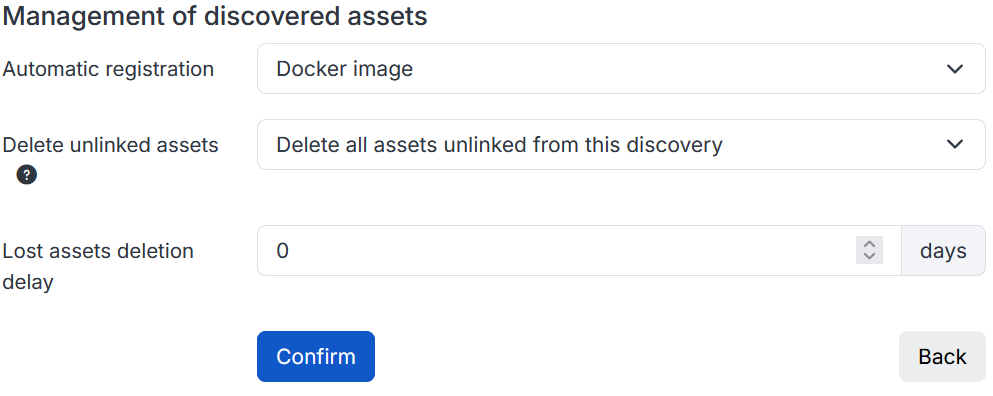
When configuring a discovery, you can define the Docker registry to be analyzed and enable automatic recording of detected images.
In addition, Cyberwatch allows you to automatically delete assets on Cyberwatch that correspond to images that are no longer present in the registry, ensuring that your inventory is always up to date.
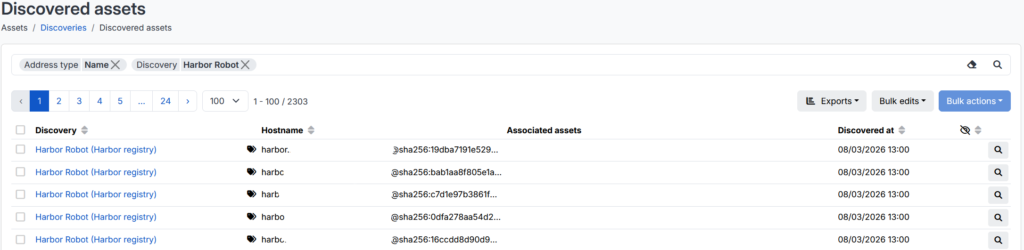
Once the discovery is complete, if the automatic recording option has been enabled, the detected images will be added directly to Cyberwatch, where they will be analyzed to identify any vulnerabilities. This discovery can be performed periodically by Cyberwatch, which will ensure that the inventory remains consistent with the actual state of the registry and report any vulnerabilities found.
In order to stay informed of new vulnerabilities identified by these analyses, it is also recommended that you set up alerts, which can be configured for Docker images, and which will email you a list of impactful vulnerabilities according to your prioritization criteria.
The Harbor scan
In the previous section, we explored how to monitor a Docker registry directly from Cyberwatch. However, in the case of Harbor, the subject can be approached from the other direction, scanning Docker images directly from Harbor using Cyberwatch as an external vulnerability scanner.
In practical terms, you will be able to run a vulnerability scan and view the results directly from the Harbor interface. This configuration improves the automation and security analysis of images, with the aim of quickly detecting vulnerabilities.
Workshop: how to add Cyberwatch as an external vulnerability scanner
The procedure is described in full in the documentation.
The first step is to configure Cyberwatch as a vulnerability scanner on Harbor. The configuration elements, including the necessary API and authentication keys, can be obtained from the Cyberwatch administration section.
Once the scanner is configured, it can be selected by default:
This way, still from the Harbor interface, you can run a vulnerability scan on the desired images and get the results directly.
Information sharing, exports, and metrics
In a DevSecOps approach, the management, processing, and relevant sharing of information are as important as risk and vulnerability analysis.
Indeed, even the most optimal analysis is only effective if the information is properly disseminated to stakeholders. The ability to extract, structure, and exploit the results of analyses makes it possible to optimize the remediation of vulnerabilities and ensure effective monitoring of the security measures put in place.
To facilitate this management, Cyberwatch offers several mechanisms for retrieving and viewing data:
- Export generation: different types of exports can be generated from Cyberwatch, such as management summaries, detailed technical reports, or raw information reports on an asset, a scope of assets, or the entire fleet.
- Alert setup: you can be notified automatically by email, via a webhook, or directly on Teams when critical vulnerabilities are detected and/or according to your own criteria.
- Kibana: The Kibana tool is automatically integrated into Cyberwatch, with pre-configured and customizable dashboards for tracking security metrics.
To go further
Want to scan your Docker images before they are even deployed to your registry?
We will soon be publishing an article to show you how to integrate Cyberwatch vulnerability scanning into a CI/CD pipeline, in order to identify vulnerabilities as early as the build phase!