
In 2024, organizations experienced an average of nine cloud security incidents, and nearly nine in ten report the number keeps climbing year over year (source: IDC / Microsoft study).
The takeaway is simple: every new cloud resource expands the attack surface. And some of the riskiest issues fly completely under the radar. A Security Group patched in a hurry during a debugging session and never locked back down can quietly leave a service exposed for months, with no one the wiser.
That’s precisely the kind of quiet, easy-to-miss misconfiguration CSPM (Cloud Security Posture Management) was built to catch. It continuously inventories exposed resources, surfaces configuration gaps, prioritizes risk, and drives remediation before small oversights spiral into serious incidents.
In this article, we break down what CSPM really means, why it’s become a must-have, and how Cyberwatch helps you put it into practice, covering workload protection (CWPP) and container security as part of a full CNAPP strategy.
What is CSPM and why has it become essential?
Definition and core principles
CSPM is a cybersecurity approach designed to continuously assess, monitor, and improve the security posture of cloud environments.
Its core premise: ensuring that an organization’s cloud resources are properly configured, exposed only as much as necessary, and aligned with security best practices.
What cloud exposure actually covers
An organization’s cloud footprint is far broader than a simple inventory of virtual machines.
It spans every resource deployed across cloud providers (AWS, Azure, GCP, OpenStack), including:
- The configurations tied to each service
- Identities and access rights
- Data stored in the cloud (S3 buckets, managed databases, backups, Azure Blob storage…)
- Resources exposed to the internet, sometimes unintentionally
- Network settings (security rules, subnets, interconnections)
- Applied security controls (encryption, authentication, logging)
Cloud exposure, then, covers anything in your environment that could be accessible, misconfigured, or inadequately protected, particularly when measured against established security frameworks like the CIS Benchmarks.
Why the cloud creates new blind spots
Unlike on-premises infrastructure, cloud environments are neither static nor centralized. The widespread adoption of multicloud, whether public, private, or hybrid, multiplies entry points and fragments visibility: resources are spread across multiple platforms, each with its own management model.
But what really compounds the problem is speed. Modern architectures— containers, Kubernetes, CI/CD pipelines— spin up resources with lifecycles measured in minutes, sometimes seconds.
A Kubernetes pod can appear, get exposed, and disappear before it’s ever been inventoried. An image automatically pushed through a CI/CD pipeline can introduce a vulnerability before any team has had a chance to catch it.
On top of that dynamic complexity, there are more familiar but no less critical blind spots:
- Test environments left running long after they’re needed
- Access rights that accumulate without regular review
- Shadow IT that flies completely under the security team’s radar
Without a dedicated tool, maintaining a reliable, current picture of what’s actually exposed becomes impossible.
Mounting regulatory pressure
Alongside these technical challenges, the regulatory environment is tightening fast. The NIS2 directive, in effect since October 2024, mandates stronger cyber risk management obligations with penalties reaching up to 2% of global annual revenue.
ISO 27001, GDPR, SecNumCloud: the frameworks that directly govern cloud security keep multiplying, and they now demand continuous traceability, well beyond the annual audit.
In this context, CSPM has become as much a compliance tool as an operational security one.
CSPM in practice: the 4 core functions
1) Automated cloud asset inventory
You can’t secure what you can’t see.
The first function of CSPM is to automatically identify every asset deployed in the cloud— virtual machines, containers, managed services, storage accounts, network resources— regardless of provider.
This inventory needs to be dynamic: a resource spun up today should appear in the monitored scope with no manual intervention required. That’s the non-negotiable baseline for keeping an accurate map in environments where deployments happen around the clock.
2) Risk detection and prioritization
Once assets are identified, CSPM solutions analyze their real-world exposure. That means detecting known vulnerabilities (CVEs) as well as flagging misconfigurations: an unnecessarily open port, a deprecated protocol, an unprotected access key.
But detection alone isn’t enough: you need to know what to fix first.
In cloud environments where vulnerabilities number in the thousands, prioritizing by raw CVSS scores alone doesn’t cut it. Context has to be factored in: the business criticality of the asset, its network exposure, and the actual likelihood that a given flaw will be exploited.
3) Continuous compliance monitoring
CSPM continuously checks cloud resource configurations against recognized security frameworks, most notably the CIS Benchmarks, as well as an organization’s own internal policies.
This ongoing monitoring is critical: a configuration that passes today may fail tomorrow after an update, a manual change, or a new deployment. The annual audit just doesn’t cut it anymore.
4) Remediation and patch orchestration
The last function of CSPM is turning detection into action. That means delivering precise, actionable guidance: not just flagging an anomaly, but specifying exactly which version to patch, which configuration to change, which access to revoke.
In modern environments, remediation needs to slot cleanly into existing workflows: connecting to ticketing systems, patch management platforms, and IT team processes without creating extra friction.
CSPM with Cyberwatch: from discovery to remediation
Multi-cloud discovery (AWS, Azure, GCP, OpenStack)
Visibility into cloud assets is the foundation of any CSPM strategy. Cyberwatch delivers it through native discovery mechanisms that automatically identify machines deployed across major cloud providers.
In practice:
AWS Discoveries: Cyberwatch queries the Amazon EC2 API directly to list all instances and their metadata (ID, IP, state, tags). It uses an IAM role with read-only permissions, in strict adherence to the principle of least privilege. Discovery can also be segmented by IAM role to isolate environments.
Azure Discoveries: Via the Azure Resource Manager API, Cyberwatch inventories virtual machines and their attributes (name, IP, resource group) using a service account with read access to compute resources.
Google Cloud Platform Discoveries: Discovery runs through the GCP API, listing VMs and their metadata (zone, IP, state) via a service account with read access to Compute Engine.
OpenStack Discoveries: For private infrastructure, Cyberwatch connects to the OpenStack API to retrieve instances and their properties, particularly useful for organizations running a mix of public and private cloud.
Beyond API-based discovery, Cyberwatch also supports connection methods suited to specific cloud contexts. For an AWS instance, a standard SSH connector can be paired with AWS Systems Manager (SSM) access, enabling interaction with machines that have no direct network exposure, which strengthens both security and operational flexibility.
Creating a cloud project asset also triggers an automatic inventory of all associated managed services and resources: storage services (S3, Cloud Storage), managed databases (RDS), network resources, IAM users and roles.
All of these assets— virtual machines, managed services, identities— are consolidated into a comprehensive, continuously updated inventory. This is the essential prerequisite for any CSPM strategy: without full visibility, exposed or misconfigured resources can slip through the cracks, and the attack surface can never be truly controlled.
3D prioritization: CVSS-BTE, EPSS, CISA KEV
Cyberwatch doesn’t just detect vulnerabilities. It prioritizes them through a three-dimensional, context-aware approach.
Prioritization is built on a criticality policy defined per asset, based on its specific security requirements (Confidentiality, Integrity, Availability). This policy applies the environmental metrics from the CVSS standard (v2, v3, v4) to calculate an adjusted score, the CVSS-BTE, which reflects both the intrinsic severity of a vulnerability and its potential impact on the affected asset.
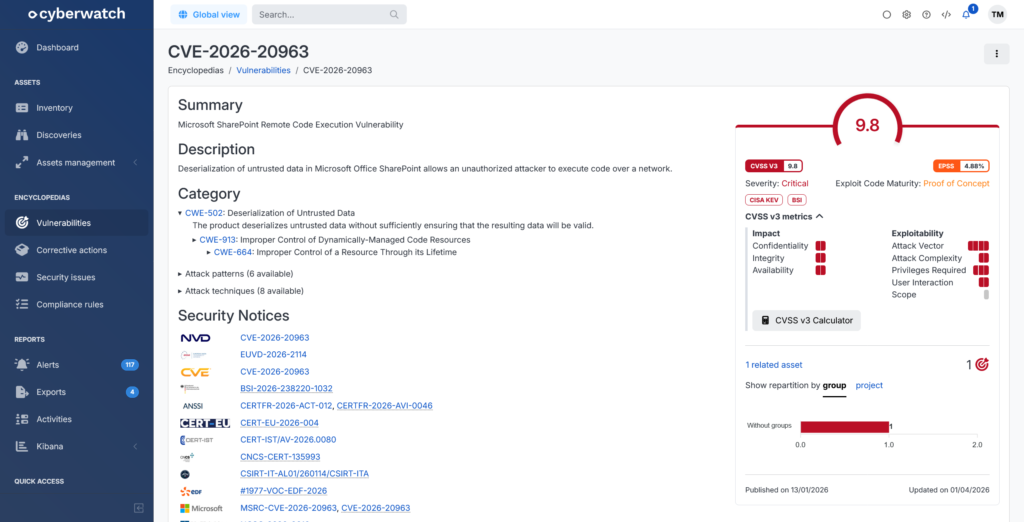
In practice, a server fully isolated from the network may see the criticality of its remotely exploitable vulnerabilities automatically downgraded. A flaw affecting an internet-facing production system, on the other hand, stays high priority.
This contextualization is backed by two additional signals:
- The EPSS score, which reflects the real-world probability of exploitation
- Presence in authoritative catalogs such as CISA KEV or CERT-FR ALE, which flag actively exploited vulnerabilities
The result: risk isn’t assessed as an abstract severity rating, but as actual exposure for a specific asset.
CIS Benchmark compliance for cloud environments
Cyberwatch continuously monitors cloud configurations against the CIS Benchmarks, covering AWS, Microsoft Azure, Google Cloud Platform, and Microsoft 365. In practice, that means hundreds of hardening rules verified automatically and on an ongoing basis.
A few concrete examples:
Microsoft Azure:
- CIS-Azure-4.1: Secure transfer required enabled on storage accounts
- CIS-Azure-4.4: Periodic regeneration of Storage Account access keys
- CIS-Azure-4.6: Public Network Access disabled for storage accounts
- CIS-Azure-7.1: RDP access from the internet assessed and restricted
Google Cloud Platform:
- CIS-GCP-3.1: Default network removed from projects
- CIS-GCP-3.3: DNSSEC enabled for Cloud DNS
- CIS-GCP-4.1: Default service account not used on instances
- CIS-GCP-4.3: Project-wide SSH key blocking enabled for VMs
AWS:
- CIS-AWS-1.4: No access keys present on the root account
- CIS-AWS-1.5: MFA enabled for the root account
- CIS-AWS-1.8: Password policy enforcing a minimum length of 14 characters
- CIS-AWS-1.12: Dedicated support role created for secure incident management
Beyond standard frameworks, Cyberwatch also supports custom rules tailored to each organization’s internal policies.
Built-in remediation and ITSM integrations
Cyberwatch delivers precise remediation guidance based on official vendor advisories. Each recommendation specifies the patched version or fix to apply, accounting for system-specific details, including distribution-specific branches for Linux.
For implementation, the platform leverages native system mechanisms:
- Linux: package managers (APT, YUM, DNF) to apply patches
- Windows: Windows Update to deploy the required KBs
- Third-party Microsoft products: winget to install or update applications
Cyberwatch also integrates with existing IT tooling: patch management solutions (WAPT, Ivanti, Intune) and ticketing platforms (ServiceNow, Jira, GLPI). A validated vulnerability can automatically generate a pre-populated ticket with full context: affected asset, criticality level, recommended fix.
From CSPM to CNAPP: how Cyberwatch unifies cloud security
Cyberwatch fully covers the needs of a modern CSPM, but it doesn’t stop there.
Today’s cloud environments go well beyond virtual machines: containers, Kubernetes clusters, CI/CD pipelines, and hybrid workloads coexist in increasingly complex architectures.
To address this, Cyberwatch incorporates CWPP (Cloud Workload Protection Platform) capabilities, laying the foundation for a truly unified CNAPP (Cloud-Native Application Protection Platform) strategy.
Workload protection with CWPP
CWPP focuses on protecting workloads— virtual machines, servers, containers, infrastructure components— against vulnerabilities, misconfigurations, and the threats that follow from them.
Where CSPM addresses cloud posture, CWPP goes deeper into the workloads themselves, whether they run in the cloud, on-premises, or in hybrid environments.
Cyberwatch brings inventory, classification, and analysis of all workloads into a single platform, regardless of type or location:
- On-premises infrastructure: hypervisors, servers, network appliances, through dedicated discovery covering VMware vSphere/ESXi, Microsoft Hyper-V, Proxmox, Nutanix, Active Directory, Fortinet, Stormshield, and more
- Public cloud: AWS, Azure, GCP, OpenStack, using the same discovery mechanisms described in the CSPM section
- Internet exposure: through DNS enumeration, Certificate Transparency, and WHOIS data, Cyberwatch surfaces publicly exposed domains, services, and machines, including ones that are poorly documented or simply forgotten, which can represent a significant attack surface
This comprehensive approach gives organizations a clear picture of their real exposure, regardless of where workloads run.
That visibility is backed by deep analysis capabilities across more than 80,000 technologies. Cyberwatch inspects operating systems, application dependencies (Pip, npm, Gem…), and components embedded in containers, delivering a consistent level of analysis whether a workload lives in the cloud or on-premises.
Container and Kubernetes security
Cyberwatch analyzes containers through a two-stage approach. Since a Docker image is typically built around a minimal OS environment hosting an application component, the platform starts by scanning all packages in the underlying operating system. This first layer surfaces vulnerabilities affecting the image’s system base.
It then goes a level deeper, detecting the application’s software dependencies: libraries, runtimes, and packages from ecosystems like Pip, Gem, or npm.
This dual approach simultaneously surfaces OS-level vulnerabilities and those introduced by application components.
Beyond the image itself, Cyberwatch extends coverage to runtime environments. The platform handles discovery and inventory of Kubernetes clusters (AKS, EKS, OpenShift, Rancher), Docker Swarm, and image registries (Amazon ECR, Harbor, GitLab Registry). Newly deployed images can be scanned automatically, ensuring continuous oversight throughout the containerized workload lifecycle.
DevSecOps and CI/CD integration
Cyberwatch integrates natively into DevSecOps workflows through built-in support for Harbor scanner integration and direct insertion into GitLab CI/CD pipelines. This shifts security left: non-compliant or vulnerable images can be blocked before they ever reach production.
That’s the whole logic of CNAPP: cloud posture, workload protection, and container security are no longer handled in silos, but as part of a coherent, automated continuum, from initial inventory all the way through to remediation.
Summary
In 2026, multicloud has gone mainstream. Yet many organizations still lack a reliable, current picture of what’s actually running in their cloud environment, or what’s genuinely exposed.
CSPM addresses that gap directly: continuously identifying cloud resources, detecting misconfigurations, prioritizing real risk, and driving remediation. At this point, it’s not optional. It’s table stakes for any organization serious about security.
With Cyberwatch, that approach becomes fully operational:
- A centralized, continuously updated automated inventory of all your cloud resources (AWS, Azure, GCP, OpenStack)
- Context-aware vulnerability prioritization based on CVSS-BTE, EPSS, and the CISA KEV and CERT-FR ALE catalogs, so effort goes where risk is real
- Continuous compliance monitoring via CIS Benchmarks for AWS, Azure, GCP, and Microsoft 365
- Integrated, traceable remediation connected to your existing tools (ServiceNow, Jira, GLPI, Intune…)
- Full coverage extending to workloads, containers, and Kubernetes clusters, for a truly unified CNAPP approach
Request a free demo and get a concrete assessment of your cloud exposure.
FAQ
What’s the difference between CSPM and a traditional vulnerability scanner?
A traditional vulnerability scanner analyzes the assets you explicitly point it at. CSPM goes further: it automatically discovers all your cloud resources, including ones you don’t know about, analyzes their configurations, and monitors for compliance on an ongoing basis, not just at the moment of a scan.
What’s the difference between CSPM and CWPP?
CSPM focuses on the posture and configurations of cloud environments. CWPP (Cloud Workload Protection Platform) goes deeper, down to the workloads themselves— virtual machines, servers, containers— analyzing and protecting them against vulnerabilities and misconfigurations, whether they run in the cloud, on-premises, or in hybrid environments.
Does CSPM help meet NIS2 requirements?
Yes. Article 21 of the NIS2 directive requires covered entities to implement a range of cyber risk management measures, including vulnerability management, configuration controls, supply chain security, and traceability of remediation actions. CSPM directly addresses several of these: continuous asset inventory, misconfiguration detection, context-aware vulnerability prioritization, and patch tracking. It also generates the evidence needed in the event of an audit or review by the relevant authority.
Is CSPM only for large enterprises with complex multicloud environments?
Historically, yes, but modern solutions have become far more accessible. Cyberwatch, for example, is built to scale across large organizations and mid-sized businesses alike, with fast deployment and straightforward integration into existing tooling.
What’s the difference between CSPM and CNAPP?
CSPM focuses on cloud posture and configurations. CNAPP is a broader approach that builds on CSPM and adds workload protection, container security, and DevSecOps integration. CSPM is a core building block of CNAPP, but CNAPP goes further.
How does CSPM fit into a DevSecOps approach?
By shifting security controls as early as possible in the development cycle: scanning container images before deployment, blocking vulnerable images in the CI/CD pipeline, and integrating with team tooling (GitLab, Harbor…). The goal is to make security a continuous part of the application lifecycle, not a final checkpoint.